Polarr: Photo Filters & Editor
- 3.8
- Rating
- 10.00M
- Installs
- Free
- Price
 Analysis by App-foxy
I spent time with Polarr: Photo Filters & Editor as a photography app, paying attention not only to the finished image but also to how comfortably different people can move through the editing process. Its main appeal is clear: it gives you a large creative playground for changing the mood of a picture without requiring a desktop editor. I found it most interesting when I treated it as a tool for building a repeatable visual style rather than as a one-tap filter machine.
Polarr is free to install, intended for Everyone, and developed by Polarrcan. It has been available since Aug 2, 2015, and the current version is 6.12.0. The app has passed the point where it feels like a brand-new experiment; it has a substantial audience, with over 10 million installs, an average rating of 3.8 from around 146 thousand ratings, and about 2.2 thousand written reviews. Those figures suggest a useful but not universally effortless experience, which matches my own impression: the creative tools are appealing, while the amount of choice can make the interface feel demanding.
How Polarr feels to navigate and read
The first thing I noticed is that Polarr is built around visual exploration. You open a photograph, browse editing controls, and gradually move from broad changes to more deliberate adjustments. That approach suits people who enjoy comparing looks, but it can be less comfortable for anyone who wants a short, obvious path from an original image to a finished one.
You May Also Like

 Google Keep - Notes and lists
Google Keep’s Quiet Growth Shows the Appeal of Simpler Notes
As mobile work gets busier, Google Keep keeps winning a simple contest: capture a thought quickly, find it later, and get on with the day.

 Blood Strike: 2.5 Anniversary
Blood Strike’s Loadouts Turn Every Drop Into a Tactical Gamble
A close look at Blood Strike’s custom loadouts: how fast access to signature weapons reshapes its battle royale rhythm, rewards preparation, and narrows the gap between fights.

 Pandora - Music & Podcasts
Pandora’s Music Is Easy to Start, but Harder to Recover
Pandora’s strength is its low-effort path from a seed to a station. Its weak spot is how much confidence it asks you to place in connection, setup, and quiet recovery.

 8 Ball Pool
 Is Built on Rivalries, Rematches, and Routine
A close look at the rivalries, rematches, shared routines, and unanswered safety questions that turn a quick pool match into a persistent mobile community.

 Samsung Music
’s Quiet Strength Is Playing What You Already Own
Its reach comes less from spectacle than from dependable access to a personal library. That simplicity is both the app’s strongest retention engine and its ceiling.

 AccuWeather: Weather Radar
AccuWeather Review: A Quick, Clear Forecast for Everyday Decisions
For everyday plans, the best forecast is the one you can understand quickly. AccuWeather makes rain timing, radar, and local conditions easy to act on, with a few trade-offs.
More From Our News Desk



The app’s strongest navigation idea is the separation between an overall look and the details underneath it. I can begin with a filter to establish a direction, then refine the result instead of accepting the preset unchanged. That makes the workflow easier to understand than an editor that presents every control at once. At the same time, the number of possible adjustments means I have to remember where I made a change. When I am working quickly, I prefer to make one broad decision at a time and check the image before opening another group of controls.
For readability, the visual preview does most of the communication. That is helpful when the important question is whether skin looks natural, whether a sky has enough separation, or whether a dark corner has become too heavy. It is less helpful when I need to distinguish several similar options by name or remember what a control will affect before moving it. People who find small labels, dense tool rows, or low-contrast interface elements tiring may need more time with Polarr than with a very simple editor.
I also found that the app rewards a consistent personal routine. I usually start by checking the whole image, choose a general mood, and only then adjust color or light. If I jump between unrelated controls, the editing screen becomes mentally noisy. A useful habit is to pause after each major change and compare the result with the original. This prevents the common problem of making an image look dramatic simply because each new adjustment seems impressive in isolation.
The most useful way to approach Polarr is as a layered decision-making tool, not a collection of random effects. That distinction matters for navigation. A beginner can stay with broad visual changes, while a more experienced user can use the same image as a starting point for careful refinement. The app does not force one level of commitment, but it does make deeper exploration available, and that can be either empowering or overwhelming depending on how much visual control you want.
Learning the editing rhythm
I would not hand Polarr to someone who wants to edit a picture in a few seconds without looking around. A simpler phone editor is easier for that job. Polarr makes more sense when you are willing to learn the relationship between the preview and the controls. After a short period of experimentation, I found it easier to predict which changes would improve an image and which would merely make it louder.
One practical technique is to use a deliberately ordinary photo during the first session. A picture with a face, a bright area, a shadow, and a few different colors reveals more than a perfect landscape. It lets you see whether a look keeps skin believable, preserves detail, and maintains enough contrast for people with different visual preferences. This is also a good way to learn without risking an important photo.
Motor, visual, and sensory considerations
Photo editing is a hands-on activity, so motor comfort matters. Polarr works best when I can make controlled gestures and inspect the preview after each one. Someone with limited precision, hand tremors, or fatigue may find repeated fine adjustments tiring, especially when the desired result depends on moving a control only a little. In that situation, starting with a broader filter and making fewer refinements is more practical than chasing a perfect setting.
A stylus or a larger screen could make some editing tasks more comfortable for certain users, but I would not treat either as a requirement for using the app. The important point is that Polarr asks for visual judgment and repeated interaction. If touching small interface targets is difficult, the app may feel slower than a basic editor with fewer choices. I would test it with a nonessential image first and see whether the gestures feel manageable before committing to a longer editing session.
For people sensitive to intense color or strong contrast, the app’s creative range can be both useful and risky. A filter that looks exciting in a quick preview may produce harsh highlights, crushed shadows, or oversaturated colors. I recommend checking the image at a calmer intensity rather than judging only the most dramatic version. This is especially important when the picture will be viewed by family members or shared in a group where people may have different visual comfort levels.
There is also a sensory advantage in being able to work from a still image at your own pace. Unlike an action-heavy application, Polarr does not require quick reactions. I can stop, inspect, undo a decision, and return to the image later. That makes it a better fit for reflective editing than for people who want an instant result with no visual decision-making.
One less obvious workflow helped me reduce strain: I separate selection from polishing. First, I decide whether the photo needs a warmer mood, a cooler mood, more separation, or a softer treatment. Only after that do I make small changes. This prevents me from repeatedly scanning every available control, which can be tiring for anyone dealing with visual overload or limited concentration.
Using Polarr in everyday situations
A realistic example is preparing a small set of family photos after a day outside. The lighting may vary, and I may want the images to feel related without making every face look artificial. With Polarr, I can choose a general direction for the group, then adjust each picture according to its own lighting. The trade-off is time: the app gives me more room to create consistency, but it does not remove the need to inspect each image.
For social posts, the app is useful when the image needs a recognizable atmosphere rather than a technical repair alone. I might use a softer treatment for a quiet indoor photograph or a stronger color direction for a travel scene. I would avoid applying the same intense look blindly to every picture, because different cameras, lighting conditions, and skin tones respond differently. Polarr is better when I treat filters as starting points.
It can also help someone who wants to develop a personal visual identity without learning a full desktop program. I can experiment with the same photograph in several directions and compare what feels natural. That comparison is more valuable than simply collecting effects. Over time, it teaches me to notice whether I prefer muted color, warmer shadows, brighter subjects, or a more cinematic balance.
For users who edit while commuting, waiting, or working in short breaks, the app’s suitability depends on the image and the goal. A quick filter choice is manageable, but detailed work is easier when I have a stable position, enough attention, and a screen I can view comfortably. I would not recommend making subtle color decisions in harsh sunlight or while walking. The preview is central to the experience, and poor viewing conditions can lead to edits that look very different later.
This is where Polarr compares interestingly with the usual alternatives. A basic gallery editor is faster and less demanding, but it usually offers less room for a carefully shaped style. A social media editor may be convenient for immediate sharing, yet it tends to encourage a quick, platform-oriented result. A full desktop editor can provide deeper control and a larger working area, but it requires more setup and is less convenient for casual phone photography. Polarr sits between those options: more expressive than a basic editor, more approachable than professional desktop software, and more deliberate than a one-tap social filter.
Three workflows that make the app more useful
My first recommendation is to use a “mood before detail” workflow. Decide what the photograph should feel like before adjusting individual elements. This reduces unnecessary experimentation and makes the interface easier to navigate. It is particularly helpful for users who become distracted by many choices, because every later adjustment has a clear purpose.
Second, compare a strong effect with a restrained version before deciding. The strongest preview often makes the difference easy to notice, but it is not always the most comfortable or believable result. Pulling back from that extreme can preserve faces, text, and important texture. This is a small habit, but it is one of the clearest ways to avoid edits that are tiring to view.
Third, use Polarr for a small, coherent set instead of processing a large camera roll without a plan. Choose a handful of related photos, establish a visual direction, and then check each image individually. This gives the app a real advantage over simpler editors because its creative flexibility becomes useful rather than distracting. It also makes the process more accessible for people who need breaks between tasks.
Where the experience still creates barriers
The biggest barrier is complexity. The app’s appeal comes from having enough creative range to move beyond a basic filter, but that range can work against users who need a very predictable interface. If your ideal editor has one obvious enhancement button, Polarr may feel like unnecessary work. I would choose a simpler alternative for quick corrections, especially when the photograph only needs a small brightness or crop adjustment.
Another barrier is the dependence on visual comparison. The app can help me shape color and atmosphere, but those decisions are difficult if I cannot comfortably distinguish subtle changes. People with low vision, color-vision differences, or strong sensitivity to contrast may need to rely on larger display settings, a comfortable viewing environment, or assistance from another person when judging the final image. I would not assume that a technically available control automatically makes every visual result equally understandable.
Motor effort can become a problem during detailed sessions. Repeated gestures and precise adjustments may not suit someone who needs large targets, minimal movement, or a very short interaction sequence. A practical workaround is to limit the number of controls used in one pass and save more ambitious editing for a time when the user is rested. If even that feels tiring, a preset-based app may be the kinder choice.
The free model also deserves attention. Polarr is free, but in-app purchases range from $0.99 to $34.99 per item. That does not make the basic app unsuitable, but it means I would pay attention to which creative options are available without spending and whether a particular workflow depends on extras. Someone looking for a completely unrestricted editing experience at no cost should compare the available tools before building a routine around them.
The age rating of Everyone makes the app approachable for a broad audience, but age suitability is not the same as ease of use. A younger user may enjoy experimenting with effects while still needing guidance to avoid oversaturated or difficult-to-read images. Likewise, an older user may appreciate the creative control but prefer a slower introduction and a less crowded editing routine.
Performance expectations should also be realistic. I would avoid treating any phone editor as equally comfortable on every device or in every situation. Large images, extended sessions, and many revisions can make a mobile workflow feel less relaxed than editing on a computer. When the task is important, I prefer to work on a small selection and keep the original image untouched until I am satisfied.
Who should use it and who should skip it
I recommend Polarr to photographers who want more personality than a standard gallery editor provides. It is a good fit for someone who enjoys comparing visual moods, wants to learn why an image feels balanced or harsh, and is willing to spend time refining a result. It also suits users who want a middle ground between casual mobile editing and a more demanding desktop workflow.
I would be more cautious about recommending it to someone who needs a highly simplified process, has difficulty with precise touch interaction, or finds strong visual effects uncomfortable. It may also be the wrong choice if your priority is batch speed rather than individual attention. In those cases, a basic editor with fewer controls or a workflow centered on automatic corrections may be more practical.
For accessibility-minded users, my advice is to test the complete path rather than judging the app from its first screen. Open an unimportant photo, try a broad adjustment, make a small refinement, compare the image with the original, and decide whether the labels and controls remain understandable. Check the app in the lighting where you normally edit. If that sequence feels comfortable, Polarr’s flexibility can become an advantage instead of a barrier.
An inclusive verdict on Polarr
After using it as a mobile photography editor, I see Polarr as a creative tool with a meaningful learning curve. Its strength is not simply the number of effects; it is the ability to begin with an overall aesthetic and then make the image feel more intentional. That gives it more depth than the usual quick filter option, while keeping the process closer to everyday phone editing than to a full professional workstation.
Its inclusive side comes from the fact that editing can happen slowly, with room to pause and reconsider. Users do not need fast reactions, and a thoughtful workflow can reduce visual clutter. However, the app still asks for comfortable reading, visual comparison, and repeated touch control. Those demands will matter more to some people than the creative freedom matters to them.
The free entry point makes it reasonable to try, while the optional purchases mean I would explore the basic workflow before spending anything. With an average rating of 3.8, I would describe it as capable rather than universally effortless. My final recommendation is simple: choose Polarr if you want to shape a recognizable look and are willing to learn its editing rhythm; choose a simpler alternative if speed, minimal interaction, or automatic results matters more than creative control.
For me, Polarr is at its best when it turns editing into a calm, deliberate process that respects the photograph instead of hiding it behind an effect. Used that way, it can be approachable and expressive. Used as a screen full of options to tap at random, it becomes tiring quickly. That difference is the key to deciding whether this particular photography app belongs on your phone.
FAQs for Polarr: Photo Filters & Editor
01What is Polarr: Photo Filters & Editor used for?
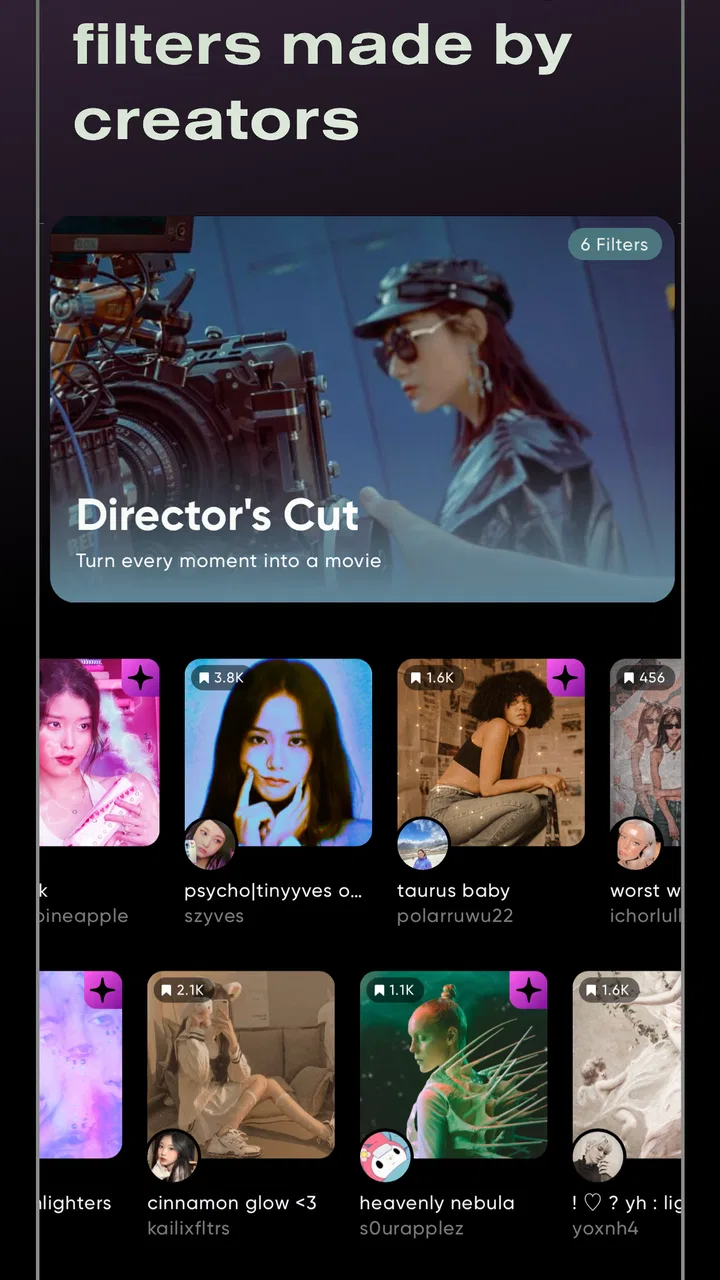
Polarr is a photo-editing app designed for users who want more control than basic brightness and cropping tools provide. After testing its workflow, I found it useful for applying filters, adjusting color and light, retouching selected areas, adding overlays, and creating a consistent visual style. It works for quick edits, social media posts, portraits, travel photos, and more carefully refined images.
02Is Polarr suitable for beginners or only experienced photo editors?
Polarr is suitable for both beginners and more experienced users, although the number of controls can feel overwhelming at first. Beginners can start with ready-made filters and simple sliders, while advanced users can explore detailed adjustments, masking, curves, HSL controls, and selective editing. The interface becomes easier to understand after a little practice, especially if you edit photos regularly.
03Does Polarr: Photo Filters & Editor work offline?
Many of Polarr’s basic editing tools can generally be used without a continuous internet connection once the app and required resources are available on your device. However, some features may depend on online access, including downloading certain effects, accessing cloud-related content, syncing projects, or using account-based services. Availability can also vary by app version, subscription status, and operating system.
04Is Polarr free to download, and are there in-app purchases?
Polarr can usually be downloaded for free, but not every feature or editing resource is necessarily included in the free experience. Premium filters, advanced tools, additional effects, or other creative assets may require an in-app purchase or subscription. Before starting a trial, check the current pricing and renewal terms in the Google Play Store or Apple App Store.
05Does Polarr reduce photo quality when saving edited images?
Polarr provides export options that allow users to save edited photos for sharing or further use, but the final quality can depend on the selected resolution, file format, compression settings, and the original image. For the best results, review the export settings before saving, particularly when preparing images for printing or professional work. Always keep the original photo if you may want to re-edit it later.
Pros
- Wide range of filters with detailed adjustment controls
- Supports RAW photos and high-resolution editing
- Selective masks allow precise edits to specific areas
- Syncs projects and presets across supported devices
- Clean interface makes advanced tools approachable
Cons
- Many premium filters and tools require a subscription
- Advanced editing can feel overwhelming for beginners
- Some features may need an internet connection
- Export options and quality settings can be confusing
- Large projects may cause slower performance on older devices

Polarr: Photo Filters & Editor
Gallery